Ewidencja czasu pracy zespołów godzinowych: przewodnik, który szanuje czas każdego
Papierowe karty pracy i wspólny arkusz kalkulacyjny po cichu kosztują firmy zatrudniające pracowników godzinowych realne pieniądze co miesiąc. Oto jak ewidencjonować czas zespołu, który nie siedzi przy biurkach — bez stawania się szefem patrzącym na zegarek.
 Have a nice day14 min czytania
Jeśli Twoja firma opiera się na pracownikach godzinowych — kuchnia, ekipa sprzątająca, warsztat, hala sklepowa, zespół opiekuńczy — to ewidencja czasu pracy nie jest sztuczką na produktywność, którą kiedyś się zajmiesz. To ona decyduje, czy pod koniec miesiąca właściwa kwota trafi na konto właściwej osoby. Jeśli zrobisz to źle, nie stracisz tylko kilku euro; stracisz zaufanie, a zaufanie to jedyna waluta, która spaja mały zespół.
Widziałem wielu właścicieli, którzy próbowali rozwiązać to zdjęciem papierowej karty pracy wysłanym na grupę WhatsApp albo wspólnym arkuszem, który jedna osoba bohatersko przepisuje w każdy piątek. Działa, mniej więcej, dopóki nie przestanie. Ktoś zapomni zapisać swoje godziny. Jeden zaokrągla w górę, drugi w dół, i zaczyna się cicha kłótnia, której nikt nie wygrywa. Lista płac zajmuje cały wieczór zamiast dwudziestu minut. Właściciel kończy jako żywy zegar kontrolny — i go to wkurza. To jest więc praktyczny przewodnik po rejestrowaniu godzin zespołu, który nie siedzi przy biurkach. Nie w korporacyjnym wydaniu z czytnikami kart i pulpitami nadzoru — w wydaniu małej firmy, gdzie potrzebujesz dokładnych liczb, potrzebujesz ich bez stawania się kontrolerem zegarka i potrzebujesz, by zespół naprawdę się do tego przyłączył. Ta ostatnia część jest tym, na czym rozbija się większość prób, więc poświęcimy jej sporo czasu.
Ile naprawdę kosztuje niechlujna ewidencja czasu
Większość właścicieli to lekceważy, bo koszt jest rozproszony i nigdy nie pojawia się jako jedna pozycja na rachunku. Ale gdy to zsumować, okazuje się jednym z najdroższych nawyków w małej firmie. Jest oczywisty wyciek — czas, który zostaje opłacony, choć nie miał miejsca, albo czas, który miał miejsce, ale nigdy nie został opłacony. Oba są złe i oba po cichu zatruwają relację z zespołem.
Jest też część, której nikt nie wlicza do budżetu: Twoje własne godziny. Jeśli spędzasz dwa lub trzy wieczory w miesiącu na ściganiu brakujących kart pracy, odcyfrowywaniu pisma i uzgadnianiu arkusza z grafikiem, to wykonujesz pół etatu pracy administracyjnej za darmo — i nigdy nie robi się łatwiej. To po prostu powtarza się w każdym okresie rozliczeniowym, tak długo, jak istnieje firma.
“Zła ewidencja czasu nie zawodzi głośno. Po prostu trochę krwawi przy każdej wypłacie i nadgryza odrobinę zaufania za każdym razem, gdy ktoś czuje się oszukany.”
A najcichszym kosztem ze wszystkich są spory. Gdy liczby są niejasne, każda różnica zdań staje się Twoim słowem przeciwko ich. Nie ma zapisu, więc nie ma rozstrzygnięcia — tylko niesmak. Dobra ewidencja czasu nie tylko oszczędza pieniądze. Usuwa z Twojego tygodnia całą kategorię drobnego konfliktu, a to warte więcej niż euro.
Dlaczego papier i arkusze przestają działać
Z arkuszem kalkulacyjnym co do zasady nie ma nic złego. Problemem jest luka między chwilą, gdy praca się odbywa, a chwilą, gdy zostaje zapisana. Przy papierze lub wspólnym arkuszu ta luka może wynosić dni — a ludzka pamięć przez kilka dni jest fatalna. Ludzie kłamią o swoich godzinach o wiele rzadziej, niż po prostu zapominają, a potem zgadują, a zgadywanie zaokrąglone na ich korzyść, pomnożone przez zespół i rok, to realna kwota.
Drugi problem polega na tym, że arkusz nie ma pojęcia, co powinno się wydarzyć. Nie powie Ci, że ktoś odbił dwanaście godzin w dniu, na który był wpisany na sześć, ani że zmiana nigdy nie została zamknięta, ani że dwie osoby zalogowały to samo zlecenie. Wiernie zapisuje to, co wpiszesz, łącznie z błędami. Wyłapywanie tych błędów to praca ręczna — Twoja — i jest to dokładnie ten rodzaj żmudnego sprawdzania, które pomija się, gdy jest się zajętym.

Jak naprawdę wygląda dobra ewidencja czasu
Zanim spojrzysz na jakiekolwiek narzędzie, warto wiedzieć, do czego dążysz. Dobra ewidencja czasu zespołu godzinowego ma kilka cech, i prawie żadna z nich nie dotyczy wymyślnych funkcji — chodzi o usunięcie tarcia dokładnie w momencie, gdy praca się zaczyna i kończy. Pierwsza cecha to rejestrowanie czasu w danej chwili, nie z pamięci — dotknięcie przy przyjściu, dotknięcie przy wyjściu. Im bliżej zapis jest rzeczywistego zdarzenia, tym jest dokładniejszy i tym mniej ktokolwiek musi odtwarzać swój tydzień w piątkowe popołudnie. Druga to działanie tam, gdzie Twoi ludzie naprawdę są. Jeśli zespół jest na nogach, na obiektach, w pojazdach lub przemieszcza się po budynku, narzędzie musi żyć w telefonie w ich kieszeni — nie na terminalu przykręconym do ściany w biurze, do którego zaglądają dwa razy dziennie. Zegar kontrolny na komputerze dla zespołu mobilnego to przepis na zapomniane godziny.
- Odbicie wejścia i wyjścia zajmuje jedno dotknięcie, w danej chwili, na urządzeniu, które ludzie już noszą.
- Właściciel widzi, kto teraz pracuje, bez obdzwaniania.
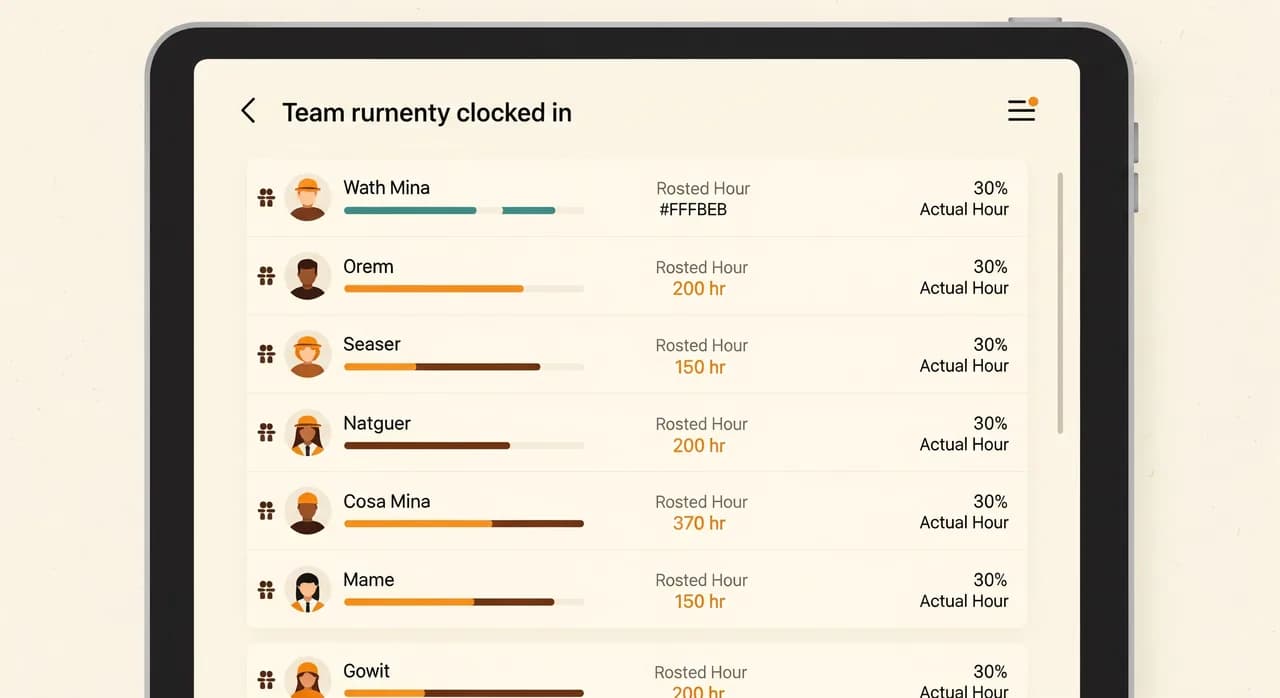
- Godziny z grafiku i godziny rzeczywiste stoją obok siebie, więc anomalie są oczywiste.
- Przerwy, nadgodziny i różne sytuacje płacowe obsługują reguły, nie liczenie w pamięci.
- W chwili wypłaty sumy są już policzone — sprawdzasz, a nie składasz od nowa.
- Jest jasny zapis, więc spór rozstrzyga się przez spojrzenie, a nie przez kłótnię.
Zauważ, czego nie ma na tej liście: zrzutów ekranu, ocen produktywności, śledzenia ruchu myszy, śladów GPS pokazujących, gdzie ktoś poszedł na lunch. To nadzór, nie ewidencja czasu, a dla małego zespołu jest zarówno zbędny, jak i niszczący. Wrócimy do tej granicy, bo liczy się bardziej niż jakakolwiek funkcja.
Drobne kwestie: zaokrąglanie, przerwy i nadgodziny
Tu dobre intencje spotykają się z rzeczywistością. Główne liczby są łatwe; to brzegi powodują kłótnie. Trzy z nich pojawiają się niemal w każdej firmie godzinowej i warto ustalić swoją politykę zanim wybierzesz narzędzie, a nie po.
Zaokrąglanie
Jeśli zaokrąglasz odbicia wejścia do najbliższego kwadransa, rób to konsekwentnie i tak, by nie faworyzować zawsze jednej strony. Niebezpieczeństwem nie jest samo zaokrąglanie — to niekonsekwentne zaokrąglanie, które po cichu obcina pracownikom minuty na każdej zmianie. Cokolwiek wybierzesz, zapisz to i uczyń widocznym. Ludzie akceptują regułę, którą widzą; mają za złe regułę, która wydaje się zmieniać w zależności od dnia.
Przerwy
Zdecyduj, czy przerwy są płatne czy bezpłatne i czy są odliczane automatycznie, czy odbijane. Automatyczne odliczenia są wygodne, ale powodują tarcie, gdy ktoś naprawdę przepracował lunch. Najczystszym podejściem dla większości małych zespołów jest pozwolić ludziom odbijać przerwę — to jedno dodatkowe dotknięcie i całkowicie ucina spór 'nigdy nie miałem tej przerwy'.
Nadgodziny
Nadgodziny to miejsce, gdzie niejasna ewidencja robi się kosztowna i gdzie lokalne przepisy pracy naprawdę gryzą. Chcesz systemu, który sygnalizuje, gdy ktoś przekracza próg w chwili, gdy to się dzieje, a nie takiego, który zaskakuje Cię w dniu wypłaty. Wiedza w czasie rzeczywistym, że zmiana zmierza ku nadgodzinom, pozwala podjąć decyzję — odesłać kogoś do domu, zatwierdzić dodatkowy czas — zamiast po prostu zapłacić za to po fakcie.

Przekonanie zespołu — część, która decyduje o wszystkim
Możesz wybrać idealne narzędzie i mimo to tu polec. Największym powodem, dla którego wdrożenia ewidencji czasu się walą, nie jest technika — to fakt, że zespół odczytuje je jako wotum nieufności. Szef myśli, że kradniemy czas. Gdy ta opowieść się zakorzeni, przegrałeś, niezależnie od tego, jak dobra jest aplikacja. Ludzie będą zapominać odbijać wejścia, niechętnie logować czas i traktować całość jako coś robionego im.
To, jak to wprowadzisz, liczy się więc tak samo jak to, co wprowadzasz. Ramą, która działa, jest szczerość co do nudnej korzyści: chodzi o to, żeby każdy dostawał poprawnie i na czas, żeby nikt nie musiał pamiętać swoich godzin i żeby spory rozstrzygały się przez spojrzenie na zapis zamiast kłótni. To nie ściema — to naprawdę główna korzyść, a Twój zespół odczuwa ból obecnego bałaganu tak samo jak Ty.
“Twój zespół nie ma za złe mierzenia czasu. Ma za złe podejrzewanie. Przedstaw to jako 'żebyś dostawał poprawnie', a nie 'żebym mógł Cię kontrolować', i wszystko się zmienia.”
- 1Powiedz im dlaczego, zanim powiesz jakDwuminutowa, szczera rozmowa: chodzi o poprawną wypłatę i koniec kłótni o karty pracy, nie o pilnowanie Cię. Powiedz na głos, czego to nie robi.
- 2Wytycz granicę nadzoru — i miej to na serioPowiedz wprost, że rejestrujesz godziny, nie lokalizację ani aktywność. Wybierz narzędzie, które nie może po cichu robić więcej, żeby Twoją obietnicę poparł program, a nie tylko Twoje słowo.
- 3Uczyń to naprawdę łatwymJeśli odbicie wejścia zajmuje więcej niż kilka sekund, ludzie nie będą tego robić niezawodnie. Przetestuj to najpierw sam. Tarcie jest wrogiem przyjęcia się narzędzia.
- 4Szybko napraw potknięcia pierwszego tygodniaKtoś zapomni, czyjś telefon spłata figla. Potraktuj wczesne potknięcia cierpliwie, nie karami — nawyk tworzy się w pierwszym tygodniu albo wcale.
Zrób to dobrze, a coś się po cichu odwróci: zespół przestaje widzieć ewidencję czasu jako Twoje narzędzie do kontrolowania ich, a zaczyna widzieć ją jako swój dowód, że przepracowali to, co przepracowali. To jest cel. Gdy pracownik mówi 'wszystko jest w aplikacji, zobaczysz, że moje godziny się zgadzają', wygrałeś.
Prawdziwy przykład: firma sprzątająca tonąca w WhatsAppie
Przedstawię to konkretnie na podstawie złożenia sytuacji, którą widziałem więcej niż raz — szczegóły zatarte, ale kształt wierny życiu. Regionalna firma sprzątająca, jakieś trzydzieści osób, rozsianych po kilkunastu obiektach każdego dnia. Każdy sprzątacz wysyłał swoje godziny wiadomością do lidera zespołu. Lider wklejał je do arkusza. Właściciel sprawdzał arkusz z grafikiem w niedzielny wieczór. Lista płac szła w poniedziałek.
Na papierze funkcjonowało. W praktyce było po cichu zepsute na każdy sposób. Wiadomości przychodziły z opóźnieniem albo wcale, więc właściciel spędzał niedziele na ściganiu ludzi. Godziny były pamiętane, nie rejestrowane, więc dryfowały w górę — nigdy dramatycznie, po prostu stały, prawdopodobny pełzający przyrost. A ponieważ obiekty były rozproszone, nikt nigdy nie mógł być całkiem pewny, że zmiana faktycznie została obsłużona, dopóki klient się nie poskarżył. Właściciel opisał to trafnie jako 'robienie listy płac jak detektyw'.
Co zmieniliśmy
Niczego nie wymyślaliśmy na nowo. Wstawiliśmy proste odbijanie wejścia na telefonie każdego sprzątacza — jedno dotknięcie przy przyjściu na obiekt, jedno przy wyjściu. Godziny z grafiku dla każdego obiektu stały obok godzin rzeczywistych, więc zmiana, która się przedłużyła lub skróciła, była widoczna od razu, nie trzy dni później. Przerwy były odbijane, nie zakładane. I co kluczowe, zadbaliśmy, by powiedzieć zespołowi prostym językiem, że to rejestruje ich godziny i nic więcej — żadnego śladu lokalizacji, żadnego szpiegowania.
Rezultat
Liczby tutaj są poglądowe, nie gwarancja — każda firma jest inna — ale kierunek był jasny i szybki. Niedzielne uzgadnianie spadło z kilku godzin do kilku minut przeglądu. Powolny przyrost w logowanych godzinach ustał, bo nie było już nic do odtwarzania z pamięci; liczba była liczbą. Spory płacowe zasadniczo zniknęły, bo każde pytanie było rozstrzygane przez wspólne otwarcie zapisu. I część, której właściciel się nie spodziewał: zespół wolał to, bo nie musieli już pamiętać, żeby do kogoś napisać, i ufali, że ich wypłata będzie poprawna.
Jak wybrać narzędzie bez przepłacania
Rynek jest pełen produktów do ewidencji czasu, a większość małych firm przepłaca — płaci za funkcje korporacyjne, których nigdy nie dotknie, jednocześnie pomijając te kilka rzeczy, które naprawdę liczą się dla zespołu godzinowego. Oprzyj się liście funkcji i oceniaj narzędzia pod kątem tego, jak naprawdę działa Twoja firma. Zacznij od poniższych pytań, mniej więcej w tej kolejności ważności: jeśli narzędzie oblewa wczesne, późniejsze nie mają znaczenia. Piękny zestaw raportów jest bezużyteczny, jeśli zespół nie odbija niezawodnie wejść na urządzeniu, które nosi.
| Pytanie | Dlaczego to ważne | Dyskwalifikacja przy nie? |
|---|---|---|
| Czy działa na telefonach, które mój zespół już ma? | Zespoły mobilne nie użyją terminala na ścianie ani komputera | Tak |
| Czy odbicie wejścia to naprawdę jedno-dwa dotknięcia? | Tarcie zabija przyjęcie w pierwszym tygodniu | Tak |
| Czy widzę godziny z grafiku obok rzeczywistych? | Tu wychodzą błędy i nadgodziny | Zwykle tak |
| Czy obsługuje moje reguły przerw i nadgodzin? | W przypadkach brzegowych żyją spory | Tak |
| Czy może ograniczyć się do godzin, bez nadzoru? | Zaufanie spaja Twój zespół | Tak |
| Czy czysto eksportuje do listy płac? | Inaczej tylko przeniosłeś przepisywanie | Tak |
| Czy łączy się z grafikiem, którym już planuję? | Jedno źródło prawdy bije dwa | Mile widziane |
Jeszcze jedna rada, która oszczędza realne pieniądze: dopasuj narzędzie do zespołu, który masz, a nie do firmy, którą sobie wyobrażasz, że się staniesz. Jeśli naprawdę prowadzisz zmiany, grafiki i płacę godzinową, narzędzie zbudowane do tego świata pasuje dużo lepiej niż ogólny minutnik 'śledź swoje projekty' wymierzony w agencje. Im bliżej założenia narzędzia są Twojej rzeczywistości, tym mniej będziesz z nim walczyć.
Rozsądne wdrożenie w czterech krokach
Jakkolwiek wybierzesz, wdrażaj to jak mały eksperyment, a nie ogólnofirmowy edykt pierwszego dnia. Wzorzec, który działa, jest ten sam, który działa przy każdej zmianie w małej firmie: udowodnij to po cichu, potem rozszerzaj.
- 1Przetestuj z jednym zespołem lub obiektem przez dwa tygodnieWybierz małą, przyjazną grupę. Znajdź ostre krawędzie tam, gdzie znalezienie ich jest tanie, a nie naraz na całej załodze.
- 2Na początku prowadź to obok starego sposobuUtrzymaj obecną metodę równolegle podczas pilotażu, żeby potknięcie nie oznaczało, że czyjaś wypłata jest błędna. Porównaj oba, a zaufanie szybko rośnie.
- 3Ustal swoje reguły i swoje sformułowaniaWykorzystaj pilotaż, by ustalić polityki zaokrąglania, przerw i nadgodzin — oraz dokładne dwa zdania, którymi wyjaśnisz wszystkim innym dlaczego.
- 4Wdróż szeroko, potem wycofaj stary sposóbGdy pilotaż jest już nudny, rozszerz go na cały zespół i wyraźnie wyłącz starą metodę, żeby nikt nie kuśtykał z prywatnym arkuszem.
Chcesz godzin, które po prostu się zgadzają, przy każdej wypłacie?
Jeśli papierowe karty pracy i niedzielny arkusz zjadają Ci wieczory, możemy pomóc Ci wdrożyć ewidencję czasu, z której zespół naprawdę skorzysta — zbudowaną wokół tego, jak naprawdę przebiegają Twoje zmiany, a nie ogólny minutnik. Pierwsza rozmowa jest bezpłatna i niezobowiązująca.
Zobacz nasze podejście do ewidencji czasuCzęste pytania
Czy ewidencja czasu to nie po prostu sposób szpiegowania pracowników?
Jesteśmy tylko małym zespołem. Czy naprawdę potrzebujemy do tego aplikacji?
Jak radzić sobie z pracownikami, którzy zapominają odbić wejście lub wyjście?
Czy to połączy się z tym, jak już wypłacam ludziom?
A co z regułami przerw i nadgodzin tam, gdzie działam?

Have a nice day to studio programistyczne, które pomaga małym i średnim firmom w cyfryzacji — automatyzacja, sztuczna inteligencja i oprogramowanie na zamówienie, które działa w codziennej pracy, a nie tylko na slajdach.