Software for Vet Practices: Cut the Admin, Keep the Patients
Most veterinary software is sold on features no one uses and priced for clinics three times your size. Here's the calmer version — what a small or mid-sized practice actually needs to spend less of the day on paperwork.
 Have a nice day15 min read
Nobody opens a veterinary practice because they love admin. You did it for the animals, and maybe for the people on the other end of the leash. Yet somewhere between the morning consult list and the last invoice of the day, a frightening amount of your week disappears into typing, chasing, re-typing, and apologising for a reminder that never went out. The software was supposed to fix that. Too often it just gave the chaos a login screen.
I've sat in enough small clinics to know the rhythm. A vet finishes a consult, scribbles notes on paper because the system is too slow to use mid-appointment, then re-enters everything at 7pm when the waiting room is finally empty. The receptionist juggles a ringing phone, a walk-in, and a booking screen that takes four clicks to do one thing. The practice owner, who is usually also a full-time vet, signs off on software invoices for modules nobody has touched in a year. This guide is for that person. Not the 20-vet referral hospital with an IT manager — they're fine. This is for the single-site small or mid-sized practice that wants less paperwork and fewer missed appointments, without betting the clinic on a year-long software migration. We'll cover what to actually look for, what to ignore, and how to switch systems without losing a decade of patient records.
Where the time actually goes in a small clinic
Before you look at a single product, it's worth being honest about where your hours leak. In most small practices the big consumers aren't clinical — they're the connective tissue around the clinic: the phone, the reminders, the invoicing, and the endless re-typing of the same animal's details into three different places.
The phone alone is a quiet monster. Every booking, every "is the wormer ready to collect", every "can I move Bella's appointment" pulls a human off another task. Reminders are the next leak: vaccinations and check-ups that should fire automatically but instead depend on someone remembering to run a report and call down a list. And then there's the no-show — the empty 20-minute slot that cost you nothing to lose and everything to fill.
“You don't have a software problem. You have a re-typing problem and a missed-reminder problem — and the right system makes both of them mostly disappear.”
Notice that none of these are about clinical brilliance. Your medicine is already good. The win from software is almost entirely in the boring layer around it — and that's good news, because the boring layer is exactly where modern tools are strongest and cheapest to fix.
The features that actually matter (and the ones that don't)
Open any veterinary software brochure and you'll drown in a feature list: lab integrations, imaging, inventory, loyalty schemes, multi-site dashboards, a dozen report types. Most of it is real. Almost none of it is what decides whether the system helps your practice on a Tuesday. For a small clinic, a short handful of capabilities does the heavy lifting.
Scheduling and the patient record, in one place
This is the spine. You want to open one screen, see the day, click an appointment, and have the animal's full history right there — past visits, vaccinations, weight, allergies, what the owner was told last time. If your scheduling and your clinical records live in separate systems that don't talk, you'll spend your life copying between them. One joined-up record is worth more than any number of clever extras.
Automatic reminders and recalls
This is the single highest-return feature in veterinary software, full stop. Vaccination due dates, annual check-ups, post-op follow-ups, parasite treatment cycles — all of these should fire on their own by text or email, with no one running a list. Done well, automatic recalls don't just save admin time; they bring patients back through the door, which means they pay for the software directly. If a product is weak here, walk away regardless of how shiny the rest looks.
Invoicing that flows from the consult
The invoice should build itself as you work — products dispensed, services performed, all captured during the visit so the bill is ready before the owner reaches the desk. Re-keying charges from a paper note into a billing screen is one of the most common, most avoidable time sinks in a clinic, and it's where money quietly slips through: a vaccine given but never charged.
What can you safely ignore at the start? Most of the advanced analytics dashboards, the marketing automation suites, the loyalty-points engines, the multi-site rollup reports. They're lovely for a chain. For a single practice they're features you'll pay for and never open. Buy the spine and the reminders first; add the rest only when a real, specific need appears.
The no-show problem, and what genuinely fixes it
Let's talk about the most expensive empty space in your clinic: the slot a client booked and didn't turn up for. In a small practice, a handful of no-shows a week adds up to a meaningful chunk of lost revenue across a year — time you'd already staffed for and can't get back.
The fix is unglamorous and it works: automated reminders, sent at the right moment, with an easy way to confirm, reschedule or cancel. A text the evening before turns a forgotten appointment into a kept one. A one-tap reschedule link turns a no-show into a moved booking that you can fill. None of this is clever AI — it's a rule with a clock and a phone number. The clinics that cut no-shows hardest are simply the ones that turned reminders on and stopped relying on people to remember.
- Send a reminder a few days ahead, and a second one the evening before.
- Include the pet's name — "Bella's check-up" lands better than "your appointment".
- Give a one-tap confirm, reschedule and cancel, not a phone number to call.
- Let a cancelled slot reopen for online booking automatically.
- Quietly flag repeat no-show clients so the desk can ask for confirmation up front.
Off-the-shelf, tailored, or somewhere in between
There's a genuine choice here, and the honest answer for most small practices is: start with a solid off-the-shelf veterinary system. The mainstream products handle the species, the drug databases, the regulatory bits and the clinical record-keeping that you really don't want to build from scratch. Reinventing a patient record is a bad use of anyone's money.
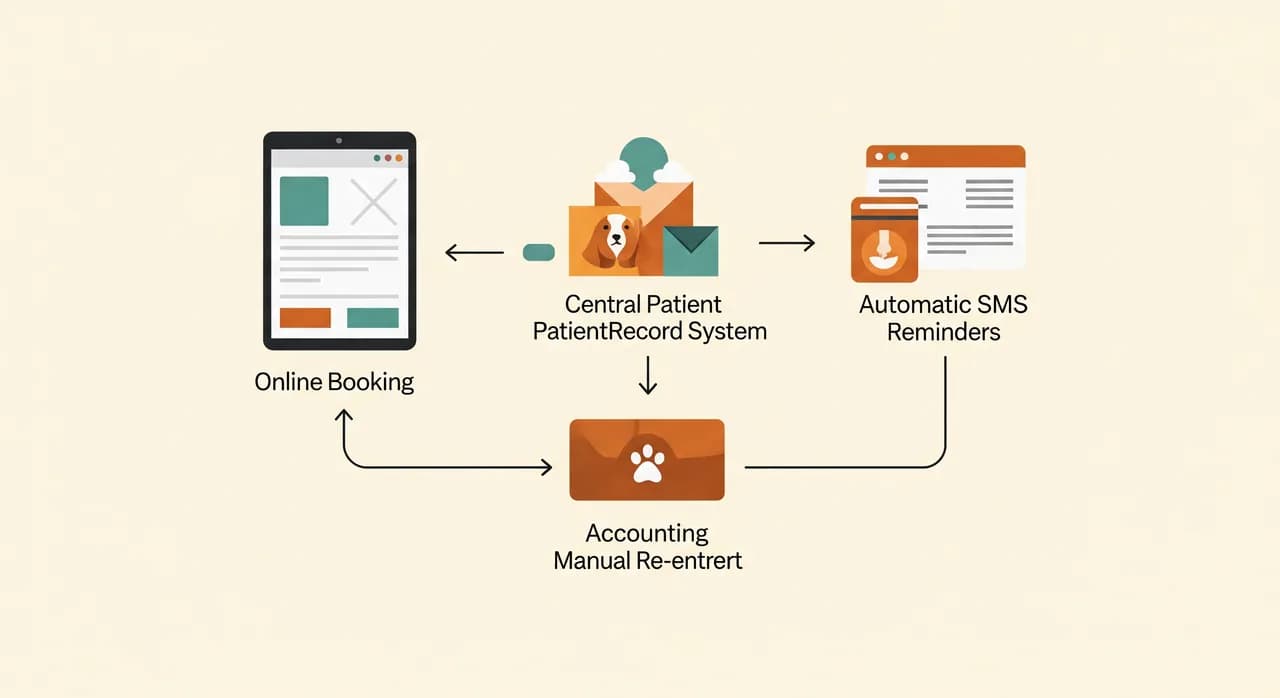
But "off-the-shelf" rarely means "and nothing else". The friction in most clinics isn't inside the core system — it's in the gaps between systems. Your practice software, your online booking page, your reminder texts, your accounting, your lab results: each may be fine alone, but if they don't talk to each other, a human ends up being the integration, copying data from one to the next all day.
That's the spot where a little custom work pays for itself many times over — not replacing your vet software, but connecting it to the things around it so the re-typing stops. A booking made online drops straight into the calendar. A finished consult pushes its charges to accounting. A new client fills in their details once, from home, and they're already in the record before they arrive. None of this is exotic; it's plumbing. But it's the plumbing that gives you your evenings back.
A small clinic that stopped working two evenings a week
Here's a composite drawn from practices we've worked with — names and numbers changed, but the shape is true to life. A two-vet small-animal clinic, busy, well-liked, with a loyal client base. On paper, thriving. In reality, both vets were staying late most days to finish notes and invoices, and the front desk was drowning in phone bookings while patients waited.
The situation
They already had a perfectly decent veterinary record system. The problem wasn't the software itself — it was everything around it. Bookings came in by phone, so the desk was tethered to the handset. Reminders were sent by manually running a report and texting clients one by one, which meant they often weren't sent at all on busy weeks. And because charges were jotted on paper during consults and entered later, the end-of-day invoice run regularly pushed the owners past 7pm.
What we changed
We didn't replace their core system — that would have been disruptive and unnecessary. Instead we added an online booking page that wrote straight into their existing calendar, switched recalls and appointment reminders to fully automatic, and connected the consult-charging step to invoicing so the bill was ready by the time the owner reached the desk. Three changes, all of them gap-closing rather than rip-and-replace.
- 1Connected online booking to the existing calendarClients could book and reschedule themselves, day or night. Phone volume at the desk dropped noticeably within weeks.
- 2Turned reminders and recalls fully automaticVaccination and check-up recalls fired on their own by text. No more manual lists — and lapsed patients started coming back.
- 3Linked consult charges to invoicingCharges captured during the visit flowed into a ready invoice, ending the nightly re-keying marathon.
The result
Within a couple of months the picture had changed. The front desk got large stretches of the day back from the phone. No-shows fell once reminders went out reliably, with an easy reschedule option. And the vets stopped staying late to do invoices — by their own account, they reclaimed something like two evenings a week. These figures are illustrative, not a guarantee, but the direction is the consistent pattern: close the gaps and the time comes back. Crucially, none of it required replacing the clinical system they already trusted.
“We expected to need a whole new system. What we actually needed was to make the systems we had stop ignoring each other.”
How to switch systems without losing your records
The single biggest fear I hear is the data. Years of patient history, vaccination records, clinical notes — the thought of moving all of it makes owners freeze, and understandably so. The fear is healthy. It just shouldn't stop you, because a careful migration is a well-trodden path.
The key is to treat the switch as a project with a checklist, not a leap of faith. Most reputable systems can export and import patient data; the work is in mapping it correctly, checking it carefully, and never burning the old system until the new one has proven itself. Done properly, your history comes across intact and nobody loses a vaccination date.
- 1Get a full export of your current data firstBefore anything else, confirm you can extract your complete patient records in a usable format. If a vendor makes this hard, that tells you something about them.
- 2Map the fields before you move anythingDecide exactly where each piece of data lands in the new system. This mapping is where migrations succeed or fail.
- 3Do a test migration and check real recordsMove a sample, then have a vet and a nurse open patients they know by heart and confirm the history reads correctly.
- 4Run both systems in parallel brieflyKeep the old one readable for a short overlap so nothing is lost while everyone settles into the new one.
- 5Only then decommission the old systemWhen a few weeks pass with no surprises and you've kept a verified backup, retire the old software — not before.
Where AI fits — and where it really doesn't yet
You'll see AI promised on every veterinary software page now, so let's be grounded. Most of what genuinely helps a small clinic isn't AI at all — it's reliable automation: reminders on a schedule, bookings that flow into the calendar, invoices that build themselves. That's a rule with a clock, not a thinking machine, and it's where the bulk of your return lives.
AI does have honest, useful roles around the edges. Drafting first-pass consult notes from a dictated summary so the vet edits rather than types. Fielding routine phone questions — opening hours, "is the prescription ready", basic booking — so the desk isn't interrupted every two minutes. Sorting incoming lab documents and emails. These are real, and worth exploring once the basics are solid. But anything touching diagnosis or treatment decisions stays firmly with the vet. AI belongs on the admin layer, not in the consult room.
Want a system that fits how your clinic actually runs?
We help small and mid-sized veterinary practices cut the admin without ripping out what already works — connecting bookings, reminders and invoicing so you spend your evenings somewhere other than the office.
See our software for veterinary practicesCommon questions
Do I need to replace my current veterinary software to get these benefits?
How much can automatic reminders really reduce no-shows?
Is it risky to migrate years of patient records to a new system?
We're a small two-vet practice. Won't proper software be overkill and overpriced?
Where does AI actually help a veterinary clinic today?

Have a nice day is a software studio that helps small and mid-sized businesses go digital — automation, AI and custom software that works in everyday operations, not just on slides.