How an AI Receptionist Quietly Cuts No-Shows for Booking Businesses
No-shows aren't a customer problem — they're a follow-up problem. Here's how an AI receptionist that answers the phone, confirms, reminds and rebooks turns empty slots back into paid ones, without nagging anyone.
 Have a nice day14 min read
An empty appointment slot is the most expensive thing in a booking business, and almost nobody puts it on the books. The room was warm, the chair was clean, the staff were paid, and at 2pm nobody walked in. There's no invoice for that loss, no line in the accounts — which is exactly why it gets tolerated for years. A no-show is a sale you already paid the costs for and never collected. Fix even half of them and you've effectively given yourself a raise, without taking a single new booking.
I've lost count of the salon owners, physios, dentists and tattoo artists who've told me, almost apologetically, that no-shows are just "part of the business." They're not. They're a predictable, mostly preventable leak — and the reason it stays open isn't laziness or bad customers. It's that the work needed to close it (calling to confirm, reminding twice, chasing the gap, offering the slot to someone else) all lands at the busiest possible moment, on the person who's already mid-treatment with their hands full.
This is the gap an AI receptionist actually fits into. Not the sci-fi version — the boring, useful version that picks up the phone when you can't, confirms appointments without you lifting a finger, and quietly fills a cancellation before it becomes an empty hour. This is a guide to how that works, where it genuinely helps, and where it doesn't.
Why people miss appointments (it's rarely what you think)
Before you fix no-shows, it helps to be honest about why they happen, because the cause tells you the cure. In years of looking at this with owners, almost every no-show falls into one of three buckets — and only one of them is about a customer who never intended to come.
The biggest bucket, by a long way, is simply forgetting. Someone booked three weeks ago, life happened, and the appointment slipped out of their head. No malice, no second thoughts — they'd have happily come if something had nudged them at the right moment. The second bucket is the silent cancellation: they decided not to come, or something genuinely came up, but there was no easy, low-friction way to tell you. Calling during opening hours to cancel feels awkward, so they just ghost. The third, smallest bucket is the genuinely unreliable customer — and there's not much technology can do about them except spot the pattern.
“Most no-shows aren't people who didn't want to come. They're people nobody reminded, and people who had no easy way to say they couldn't.”
This matters because it reframes the whole problem. You're not trying to punish no-shows or screen out bad customers. You're trying to (a) remind the forgetful in time, and (b) make cancelling so easy that the silent cancellers tell you early enough to resell the slot. Both of those are follow-up tasks. Both are repetitive. Both happen at inconvenient times. Which is precisely why they get skipped — and precisely why they automate well.
What an AI receptionist actually does
Let's strip the buzzwords off. An "AI receptionist" is a voice assistant that answers your phone, holds a normal conversation, and is connected to your booking calendar. When it works well, a caller barely notices they're not talking to a person — they ask to book, move or cancel an appointment, and it just happens, with the calendar updated in real time.
For the no-show problem specifically, four jobs matter, and an AI receptionist can quietly handle all four around the clock:
- Answering the calls you currently miss — the ones during treatments, after hours, or while you're already on the line — so a booking never goes to voicemail and never goes to a competitor.
- Confirming upcoming appointments by call or message, and noting who confirms, so you know which slots are solid and which are wobbling.
- Making cancelling effortless: a customer who can call any time and say "I can't make Thursday" will tell you days early instead of just not turning up.
- Rebooking and filling gaps — when someone cancels, the freed slot can be offered to a waitlist or a customer asking for an earlier time, instead of sitting empty.
Notice that only the first of those is really about "answering the phone." The other three are about closing the follow-up loop — the unglamorous chasing and confirming that protects your calendar but never gets done when the shop is busy. That's the real value. The phone-answering is what makes it possible; the loop-closing is what saves the money.
The four layers that actually move the number
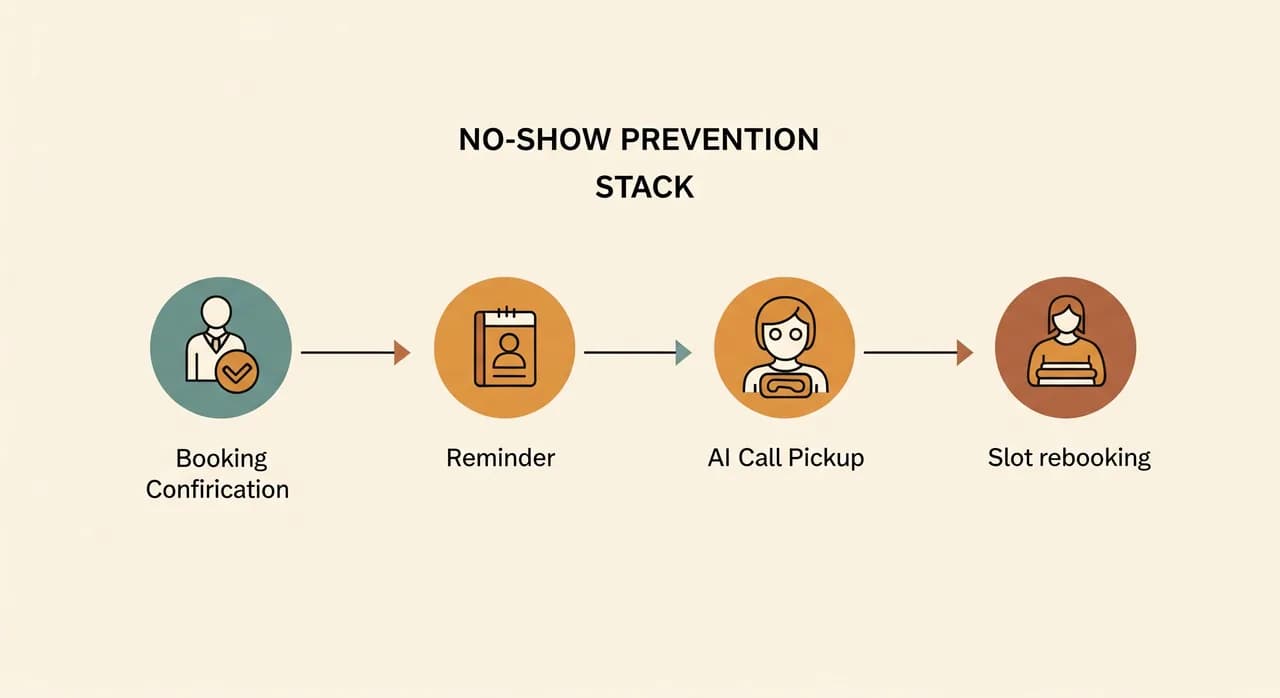
No-show reduction isn't one switch you flip. It's a stack of small, cheap interventions, each catching a different slice of the problem. You don't need all of them on day one, but it helps to see the whole stack so you know what you're building toward.
1. The confirmation at booking
The moment an appointment is made — whether online, in person or over the phone — the customer gets an immediate, friendly confirmation with the time, place and a one-tap way to change it. This sounds trivial, but a confirmation that lands instantly does two things: it puts the appointment into the customer's calendar app, and it signals that this is a real commitment someone is tracking. Appointments that feel watched get missed less.
2. The reminder before the slot
A nudge at the right time — typically a day before and again a couple of hours before — kills most of the "I forgot" bucket on its own. The key detail people get wrong is making it easy to respond. A reminder that just says "see you tomorrow" is fine. A reminder that says "reply or call to confirm, move or cancel" is far better, because it converts a silent canceller into an early one while there's still time to resell the slot.
3. The call you'd otherwise miss
Here's where the AI receptionist earns its keep beyond reminders. A customer who decides at 8pm that they can't make tomorrow will, more often than not, call you — and reach voicemail. By morning they've given up, and you've lost the chance to fill the slot. An assistant that answers that 8pm call, takes the cancellation gracefully and immediately frees the time turns a no-show into a rebooking opportunity hours earlier.
4. Filling the gap that opens
A cancellation is only a loss if the slot stays empty. The final layer is using the freed time: offering it to a waitlist, to the customer who wanted an earlier appointment, or surfacing it for online booking again. Done well, a Tuesday cancellation becomes a Tuesday booking for someone else — and your calendar barely notices the difference.
A realistic example: a three-chair salon
Let me make this concrete with a composite picture, drawn from several real booking businesses (the numbers are illustrative, not a promise — your mileage will vary). Picture a busy three-chair hair salon, fully booked most days, run by an owner who also cuts hair. They reckoned no-shows were "a couple a week." When we actually counted, it was closer to eight or nine missed or late-cancelled appointments a week across the three chairs. Each one an empty slot, paid-for and uncollected.
The cause, once we looked, was almost entirely structural rather than about bad customers. The phone rang constantly during the day, so it mostly went unanswered — every stylist was mid-cut. Customers who wanted to cancel couldn't get through, so they didn't. There was no reminder system at all; bookings made three weeks out simply relied on people's memory. The owner felt guilty about chasing people, so confirmations rarely happened.
What we put in place was deliberately unglamorous. The booking flow sent an instant confirmation with an easy change link. A reminder went out the day before and the morning of, each with a clear "call any time to change" line. And an AI receptionist answered the phone whenever the team couldn't — including evenings and the lunch rush — so a customer wanting to cancel Thursday at 7pm actually got through, the slot freed up overnight, and the morning waitlist filled it.
The rough outcome over a couple of months: missed slots roughly halved, and a good share of the cancellations that remained were caught early enough to rebook. For a three-chair salon, recovering even three or four slots a week is a meaningful chunk of monthly revenue that was previously evaporating with no trace. None of it required new customers, a bigger marketing budget, or anyone working longer hours. It just stopped the leak.
Where deposits and no-show fees fit in
A lot of owners reach for a deposit or a no-show fee first, because it feels like the obvious lever. It has its place — for high-value, long appointments, or for customers who've already let you down, a small deposit at booking sharply concentrates the mind. But it's a blunt tool, and used too widely it does real damage.
The risk is that a deposit wall scares off perfectly good customers at the exact moment they're deciding whether to book at all. You don't see those losses — they just don't book — which makes the policy feel free when it isn't. My honest advice: treat deposits as a targeted tool, not a blanket one. Fix the structural causes first with confirmations, reminders and a reachable phone. Then, if a specific slice of bookings still bleeds, add a deposit there and nowhere else.
How to roll this out without overcomplicating it
You don't need the full four-layer stack on day one, and you shouldn't try. The fastest path to a result is to start with the layer that catches the most no-shows for the least effort — reminders — and add the conversational, phone-answering piece once you've seen the gap it leaves.
- 1Count your real no-show rate for two weeksNot your guess — the actual number. Tally every missed and late-cancelled slot. Almost every owner is surprised, and you need the baseline to know if anything's working.
- 2Turn on confirmations and reminders firstInstant confirmation at booking, plus a day-before and morning-of reminder, each with an easy way to change. This alone clears most of the 'I forgot' bucket and is the cheapest thing on the list.
- 3Make cancelling genuinely easyAdd a reachable channel for changes at any hour — this is where answering the calls you currently miss starts paying off, converting silent no-shows into early, resellable cancellations.
- 4Add the AI receptionist for the calls you missLayer in a voice assistant connected to your calendar so out-of-hours and busy-hour calls get answered, cancellations are taken gracefully, and freed slots get offered out — not left to rot.
- 5Measure again and tuneAfter a month, recount. Adjust reminder timing, tighten the rebooking flow, and only then consider targeted deposits for the slots that still slip.
The order matters. Reminders are cheap and catch the biggest bucket, so they go first. The AI receptionist is what closes the harder gaps — the missed calls and the rebooking — so it earns its place once the easy wins are banked. Build the stack in that sequence and every step pays for the next.
Where an AI receptionist won't help
It's only fair to be straight about the limits. An AI receptionist is not a fix for a booking system that's already a mess. If your calendar lives in three places, or staff double-book by hand, automating on top of that just spreads the confusion faster. Get one reliable source of truth for your appointments first — everything here assumes that foundation exists.
It also won't repair a deeper relationship problem. If customers no-show because the service disappointed last time, or because pricing feels unfair, no amount of reminding will save those slots — and it shouldn't. Technology closes the follow-up gap. It can't close a trust gap. Be honest with yourself about which one you actually have before you reach for any tool.
Curious what this would look like for your bookings?
An AI receptionist that answers every call, takes cancellations any hour and fills the gaps is more reachable than most owners assume. We'll walk through your calendar and where the slots are leaking — no obligation to build anything.
See how the AI phone assistant worksCommon questions
Will customers be annoyed talking to an AI instead of a person?
Won't reminders alone fix most of my no-shows?
Do I need to replace my booking software to do this?
Is this only for big clinics, or does it work for a one-person business?
How quickly would I see fewer empty slots?

Have a nice day is a software studio that helps small and mid-sized businesses go digital — automation, AI and custom software that works in everyday operations, not just on slides.